
“How much does a mobile app cost in Canada?” sounds like a simple pricing question. It is not.
Two companies can both ask for “a mobile app” and end up with completely different projects. One may need a small customer portal with login, appointments and notifications. Another may need payments, real-time tracking, multiple user roles, a backend dashboard, maps, CRM integration, analytics and AI. Both are mobile apps, but they are not remotely equivalent projects.
That is why a responsible mobile app budget should start with the business problem, not a feature shopping list.
This guide is written for Canadian small and mid-sized businesses considering an app in 2026. It focuses on planning ranges, commercial decisions, technology trade-offs, privacy considerations and the connection between a mobile experience and the rest of your digital stack.
Business Insight
The most expensive mobile app mistake is not necessarily paying too much for development. It is spending tens of thousands of dollars building something customers, employees or partners do not use often enough to justify the investment.
1. What is a mobile app — and why would an SMB need one?
A mobile app is software designed for smartphones or tablets. For a business, the important question is not whether the app is technically impressive. It is whether the app creates a better way to perform a valuable recurring activity.
That activity might be booking, ordering, tracking, payments, customer service, field work, internal approvals, inventory, employee communication, loyalty or access to a specialised business workflow.
Customer app
Give customers convenient access to bookings, orders, accounts, support or loyalty features.
Employee app
Give staff mobile access to field tasks, approvals, forms, schedules, inventory or internal workflows.
Partner app
Connect dealers, suppliers, contractors or other business partners to specific workflows.
Commerce app
Extend eCommerce with a mobile-first ordering and customer experience.
On-demand app
Coordinate requests, bookings, dispatch, tracking, payments or service delivery.
SaaS / platform app
Provide mobile access to a subscription-based product or digital platform.
2. How much does it cost to build a mobile app in Canada in 2026?
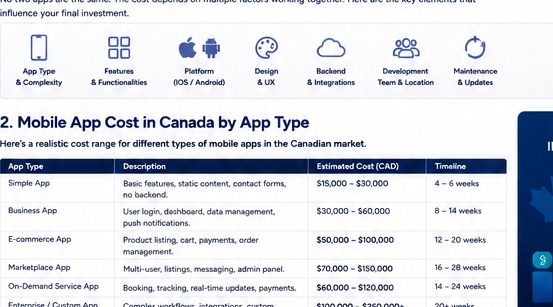
The following ranges are best used as budgeting bands, not as promises or published Canadian market averages. A final quote should follow discovery and a defined scope.
| App category | Typical planning range (CAD) | Typical scope | Planning timeline |
|---|---|---|---|
| Simple app | $10,000–$30,000 | Limited features, simple content, basic forms or a focused workflow | 2–4 months |
| Business app | $30,000–$75,000 | Login, dashboards, accounts, bookings, notifications, API integrations | 3–6 months |
| Feature-rich app | $75,000–$150,000 | Multiple roles, payments, real-time features, deeper backend and integrations | 5–9 months |
| Complex platform | $150,000+ | Marketplace, SaaS, advanced AI, large-scale integrations or complex architecture | 8–15+ months |
Do not treat the range as a quote.
Scope can move the final budget substantially. A simple-looking feature such as “live tracking” may require maps, location permissions, real-time infrastructure, backend services, notifications, security controls and extensive testing.
3. Different types of mobile apps have very different budgets
Simple information or utility app
This might provide content, calculators, simple forms, contact functions or a narrow utility. The architecture can be relatively straightforward if there are few user roles and little backend complexity.
Customer portal app
Customers may log in, view their account, book appointments, check orders, submit requests or communicate with the business. Authentication, backend integration and data security increase the project scope.
eCommerce app
An eCommerce app can require catalogues, search, cart, checkout, payments, order history, customer accounts, notifications and integration with the existing commerce platform.
Marketplace
Marketplaces are significantly more complex because they often support multiple user groups, listings, search, messaging, payments, moderation, notifications and administrative controls.
Field-service app
These can be valuable for trades, maintenance, logistics and service businesses. They may include schedules, work orders, photos, signatures, location, inventory and offline capability.
Internal operations app
An internal app can streamline approvals, inspections, checklists, employee workflows or access to ERP/CRM information. It may never appear in an app-store search, but it can still create substantial operational value.
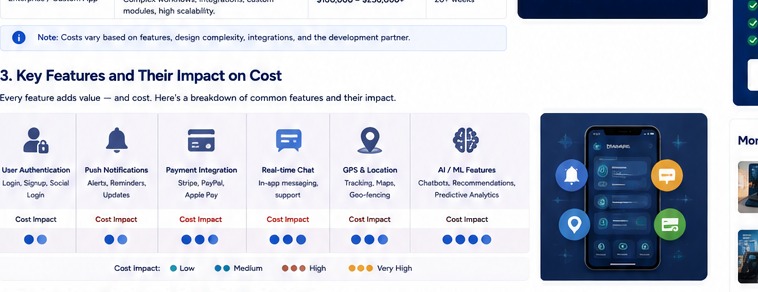
4. What factors determine mobile app development cost?
Seven cost drivers deserve particular attention.
1. Features
Every workflow, role and business rule adds design, development and testing effort.
2. Platforms
iOS, Android or both affects scope, testing and release management.
3. UX/UI
Research, user flows, prototypes and polished interaction design require dedicated work.
4. Backend
APIs, databases, authentication, admin panels and cloud services can become major cost drivers.
5. Integrations
CRM, ERP, payments, maps, telecom, analytics and third-party services add dependency and testing work.
6. Security
Authentication, data protection, permissions, logging and secure development are critical for sensitive apps.
7. Maintenance
OS updates, bug fixes, security patches, new devices and product improvements continue after launch.
8. AI features
AI can add model, API, data, evaluation, privacy, monitoring and ongoing usage costs.
9. Offline capability
Supporting poor connectivity or offline work can require substantially more architecture and testing.
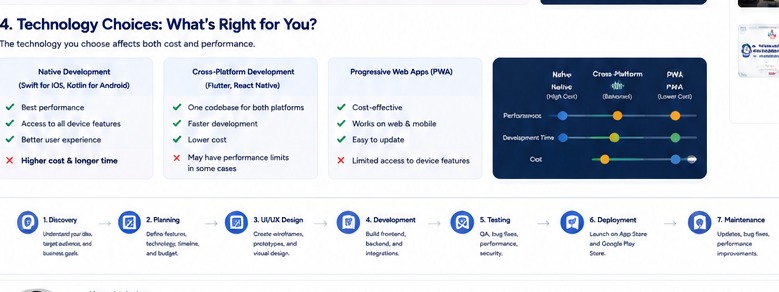
5. iOS, Android or cross-platform: which approach is best?
There is no universal winner. The correct choice depends on your target users, required device capabilities, budget, speed-to-market and long-term product strategy.
| Approach | Strengths | Trade-offs | Good fit for |
|---|---|---|---|
| Native iOS | Strong Apple ecosystem integration and platform-specific capabilities | Separate Android product required later | iOS-first audiences or platform-specific products |
| Native Android | Deep Android capabilities and platform control | Separate iOS product required later | Android-first audiences or specialised hardware use |
| Cross-platform | Can share a substantial portion of code across platforms | Some platform-specific work may still be required | Many SMB products seeking broad reach efficiently |
| Progressive Web App | Web delivery, easy distribution and lower installation friction | Not a full substitute for every native capability | Businesses where web/mobile access matters more than deep device integration |
The best technology decision is the one that fits the product requirements. Choosing a framework simply because it is fashionable is not a strategy.
6. What is the mobile app development process?
A disciplined process reduces expensive surprises later.
Store requirements also affect launch planning. Google Play requires developers to complete its Data safety disclosures, while Apple requires app privacy information in App Store Connect for new apps and updates.
7. Why an MVP can be the smarter Canadian SMB investment
An MVP — minimum viable product — is not simply a cheap version of the final app. It is a deliberately limited version designed to test the most important business assumption.
Suppose a company wants an app with 25 proposed features. Instead of building all 25, the first release might focus on the three workflows that determine whether customers actually use the product.
This can reduce initial investment, shorten feedback cycles and provide evidence before the business commits to a larger roadmap.
A good MVP answers a business question
“Will customers use mobile booking?” “Will technicians complete jobs faster with a mobile workflow?” “Will customers reorder more often through the app?” “Will an app reduce calls to support?” These are stronger MVP objectives than simply “launch an app.”
9. Canadian privacy should be designed into the app
Privacy is not a final legal checkbox. It should influence the architecture and product decisions from the beginning.
The Office of the Privacy Commissioner of Canada's mobile-app guidance highlights accountability, transparency, meaningful consent, limiting collection and appropriate safeguards as important considerations for organisations handling personal information through apps.
This matters especially when an app requests location, contacts, photos, microphone access, payment information, account information or other personal data.
Practical questions to answer before development
- What personal information does the app actually need?
- Why is each category collected?
- Where is the information stored?
- Which vendors or third parties receive it?
- How long is it retained?
- How can users understand and manage their privacy choices?
- How will access be controlled?
- What happens if the organisation experiences a breach?
Privacy obligations can differ depending on the organisation, province, industry and activity. Canadian businesses should obtain appropriate legal/privacy advice for their specific circumstances.
10. Mobile apps become more valuable when they connect to the business
A mobile app should rarely be treated as an isolated island.
For example, a customer may use an app to request service. The request can potentially enter a CRM. Sales or operations may manage it through an ERP such as Odoo. A telecom system may handle customer calls. A website may attract the original lead. Analytics can measure the customer journey.
Website → Lead → Telecom → CRM → Mobile App → Odoo/ERP → Fulfilment → Payment → Reporting → Automation
The exact architecture depends on the business, but the principle is important: the app should improve the business process, not create another disconnected database.
Our Business Phone Systems in Canada guide explains the telecom side of this architecture, while our Odoo for Canadian SMBs guide explores how ERP can connect sales, operations and finance.
11. Mobile apps + AI: where Canadian SMBs can create useful automation
AI can be valuable inside a mobile product, but it should solve a defined workflow rather than being added as decoration.
Smart search
Help users find products, documents, services or records using natural language.
Summaries
Summarise service histories, customer notes, conversations or field reports.
Recommendations
Suggest products, actions or next steps based on permitted business data.
Document capture
Extract information from forms, receipts, invoices or field documents.
Support assistant
Answer common questions and escalate cases requiring human intervention.
Workflow automation
Trigger tasks, notifications and updates when defined business events occur.
AI features should be designed with access controls, data minimisation, evaluation and human escalation where the consequences of an incorrect output are significant.
12. Is a mobile app worth the investment?
That depends on the economics of the problem it solves.
Consider a simple commercial model:
Potential annual value = incremental revenue + retained revenue + labour savings + reduced service cost + operational savings − ongoing app costs.
This is not a guarantee of ROI. It is a way to frame the business case.
For example, if an app helps customers reorder more easily, reduces repetitive calls, improves field-worker productivity or increases repeat bookings, those outcomes can be measured. The business should define the baseline before launch and then track the relevant metrics after launch.
Useful app KPIs
- Downloads and activated users
- Registration completion rate
- Monthly/weekly active users
- Feature adoption
- Repeat usage
- Conversion rate
- Average order or booking value
- Support contacts avoided
- Task completion time
- Customer retention
- Revenue attributable to app users
13. Common mobile app development mistakes
Building before validating
Businesses sometimes spend heavily before confirming the problem, user need and commercial case.
Trying to launch every feature
A large first release increases cost, testing burden and the chance of building features nobody uses.
Ignoring backend architecture
The visible mobile interface is only one layer. Poor backend design can create reliability, performance and security problems later.
Choosing technology only on price
The cheapest initial proposal may not be the cheapest product to operate, maintain and improve over several years.
Underestimating QA
Apps run across different devices, operating systems, screen sizes, permissions and network conditions. Testing is a major part of quality.
Forgetting accessibility
Readable typography, contrast, touch targets, labels and assistive-technology support should be considered during design rather than after launch.
Launching without analytics
If you cannot see how users behave, it becomes difficult to know which features are valuable and which should be changed.
14. How to choose a mobile app development partner in Canada
Do not evaluate vendors only on the number at the bottom of the proposal. Evaluate how they think.
Discovery quality
Do they ask about users, business processes, revenue and measurable outcomes?
Architecture
Can they explain backend, APIs, security, scalability and technology trade-offs clearly?
Design
Do they show a real UX process rather than jumping straight to screens?
QA
Is testing planned throughout the project instead of only before launch?
Ownership
Who owns the code, accounts, infrastructure and app-store credentials?
After launch
Is there a realistic maintenance, monitoring and improvement plan?
Ask for a scope document before asking for a final price.
A responsible proposal should make assumptions visible: platforms, user roles, integrations, environments, design scope, testing, deployment, support and exclusions.
15. What makes a mobile app project “Canadian”?
Being a Canadian app project is more than quoting in CAD.
The project should consider Canadian users, business practices, privacy requirements, time zones, support expectations, provincial considerations where relevant and the systems the business already uses.
For a Canadian SMB, this may also mean designing around local telecom, payment, accounting, CRM and ERP workflows rather than copying an overseas product architecture without considering the business context.
16. A mobile app readiness checklist for Canadian SMBs
- We can clearly describe the business problem the app will solve.
- We know who the primary users are.
- We know the most important workflow.
- We have identified the MVP.
- We know which systems need integration.
- We understand what personal information will be collected.
- We have an approximate first-year budget.
- We have someone internally responsible for the product.
- We have defined success metrics.
- We have a post-launch support plan.
If you cannot answer several of these questions, that does not mean you should abandon the idea. It means your next investment should probably be discovery and product planning, not full development.
17. Frequently Asked Questions
For planning, a simple app may fall around $10,000–$30,000 CAD, a business app around $30,000–$75,000, a feature-rich app around $75,000–$150,000, and complex products can exceed $150,000. These are planning ranges, not fixed market prices or quotes.
It depends on scope, technology and target users. Starting with one platform can reduce initial scope. Cross-platform development may allow broader reach with a shared codebase when the product is a good fit for that approach.
A focused app may take a few months, while complex products can take six months or longer. Discovery, design, integrations, testing, approvals and revisions all affect the timeline.
No. A mobile-friendly website, customer portal or existing software may be a better solution for some businesses. An app is justified when it solves a valuable recurring problem better than the alternatives.
Plan for backend hosting, third-party APIs, app-store costs, security, analytics, maintenance, support, OS updates, marketing and any AI or cloud usage costs.
Yes, depending on the required workflow and the available APIs or connectors. The app can act as a mobile interface while Odoo handles relevant operational data and workflows behind the scenes.
Potentially. Calls, messaging, customer records, notifications and other telecom workflows can be integrated where the relevant platform provides appropriate APIs or connectors.
Businesses should understand what personal information the app collects, why it is needed, how it is used and disclosed, where it is stored, how it is secured and how users are informed. Canadian privacy obligations vary by organisation and context.
Have a mobile app idea?
Start with the business case, not the code. We can help map the users, MVP, features, integrations, technology approach, estimated investment and development roadmap for your Canadian business.
Sources & Further Reading
- Google Search Central — Creating Helpful, Reliable, People-First Content
- Google Search Central — Guide to Optimizing for Generative AI Features on Google Search
- Office of the Privacy Commissioner of Canada — Mobile Apps
- Office of the Privacy Commissioner of Canada — PIPEDA
Editorial note: The CAD ranges in this article are internal planning ranges designed to help Canadian SMBs scope projects. They are not represented as official market averages or fixed quotations. Actual pricing depends on requirements, technology, team, integrations, testing, infrastructure and support.