
Your business phone system is more than a way for customers to call your company. For many Canadian businesses, it is part of the sales process, customer-service operation, appointment workflow and internal communication infrastructure.
A missed call can mean a missed sales opportunity. A confusing automated menu can frustrate a customer. A phone system that cannot work properly with remote employees can slow down a growing team. And a system that does not integrate with your CRM can leave your sales staff manually entering information that could have been captured automatically.
That is why choosing a business phone system should not be reduced to asking, “How much does a phone line cost?” The better question is:
What business problem should the phone system solve?
A good telecom solution should make it easier for customers to reach you, easier for employees to handle calls, easier for management to understand communication activity and easier for the business to scale.
In this guide, we explain the main business phone system options available to Canadian SMBs in 2026, the features that matter, the costs you should consider, what to ask a telecom provider, how number porting works and how modern telecom systems can connect with websites, CRMs, automation and AI.

What is a business phone system?
A business phone system is a communication platform designed to manage business calls and related communication. Depending on the solution, it may provide business phone numbers, extensions, call routing, voicemail, auto-attendants, conferencing, mobile applications, SMS, call recording, analytics and integrations with business software.
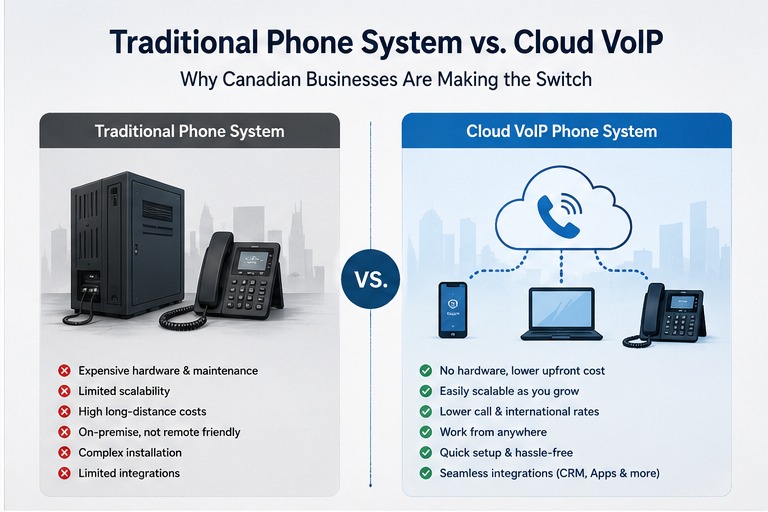
Older systems were often centred around physical office equipment. Modern systems can be hosted in the cloud, allowing employees to use desk phones, computers and mobile devices as endpoints.
This distinction is important because a modern business may no longer have everyone sitting at one physical desk. Teams can include office employees, remote employees, salespeople, technicians, customer-service staff and managers working from different locations.
Business phone system vs. personal mobile phones
Some very small businesses begin by using personal mobile numbers for business calls. That can work temporarily, but it creates problems as the business grows.
- The business may not control the number properly.
- Calls may not be routed to the right employee.
- There may be no central call history.
- Customers may not have a consistent business number.
- There may be no professional auto-attendant.
- Management may have limited visibility into missed calls.
- Customer communication may remain disconnected from the CRM.
A business phone system is therefore not simply about replacing a phone. It is about creating a controlled communication layer for the business.
What types of business phone systems are available in Canada?
Canadian businesses can choose from several approaches. The right architecture depends on the business rather than on whichever technology happens to be newest.
| System type | Best suited for | Main advantages | Potential limitations |
|---|---|---|---|
| Cloud PBX / Hosted PBX | Most modern SMBs | Scalable, remote-friendly, feature-rich | Depends on internet connectivity and provider quality |
| Basic VoIP service | Small teams with simple requirements | Simple deployment and internet-based calling | May lack advanced business workflows |
| On-premise PBX | Businesses with specific infrastructure requirements | Greater local control and use of existing equipment | Hardware, maintenance and upgrade responsibility |
| Hybrid phone system | Businesses transitioning from legacy systems | Can combine existing equipment with modern services | More complex architecture |
For many SMBs evaluating a new system today, cloud-based business communications deserve serious consideration. But that does not mean every company should immediately abandon existing equipment.
If a business already owns working hardware, has unusual requirements or operates in an environment where infrastructure control is important, the economics and technical requirements may be different.
What is VoIP and how does it work?
VoIP stands for Voice over Internet Protocol. Instead of carrying voice communication through a traditional telephone architecture, VoIP technology carries voice traffic over internet protocol networks.
From the customer's perspective, the important point is that the technology can be largely invisible. A customer can still dial a normal Canadian business number. The difference is in how the underlying communication service is delivered.
A cloud phone platform can allow employees to answer calls through desk phones, computers or mobile applications depending on the provider and configuration.
Business insight
The real value of VoIP is not simply “calling over the internet.” The bigger opportunity is turning voice communication into a more flexible business process.
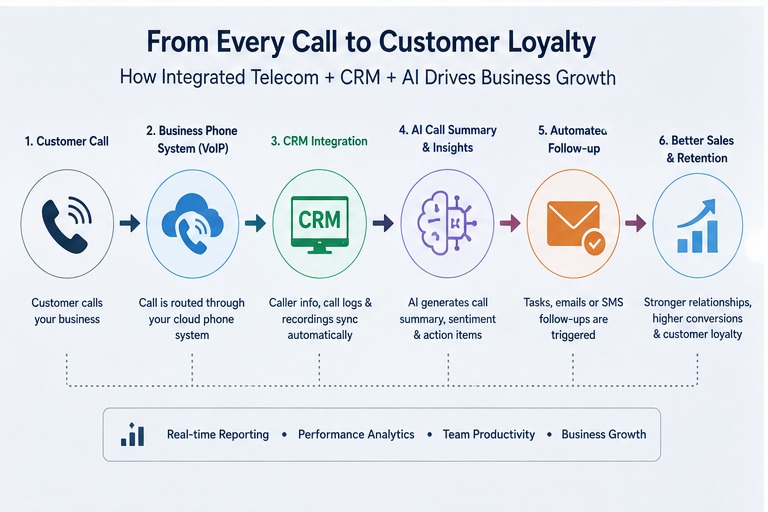
For example, a call can potentially be routed to the right employee, associated with a customer record, recorded, transcribed, analysed and followed by an automated task. The exact capabilities depend on the platform and configuration.
Which business phone features actually matter?
Telecom providers often compete by listing dozens of features. That can make comparison difficult because a long feature list does not automatically translate into a better business outcome.
Instead of asking how many features are included, ask whether the system solves your most important communication problems.
Business Numbers
Professional numbers, local numbers, toll-free options and appropriate number management for your market.
Auto-Attendant
Direct callers to departments or employees without requiring every call to be answered manually.
Call Routing
Route calls according to business hours, departments, locations, availability or other configured rules.
Voicemail
Give callers a reliable way to leave messages and help employees manage them efficiently.
Business SMS
Support customer communication through text messaging where the platform and applicable rules permit it.
Mobile Application
Allow employees to use business communication tools while working away from the office.
Call Reporting
Understand call activity, missed calls, response patterns and operational performance.
CRM Integration
Connect calls and customer communication with the systems your sales and service teams already use.
How much does a business phone system cost in Canada?
There is no single Canadian price for a business phone system. Current market pricing varies according to the provider, number of users, features, calling requirements, hardware, implementation and support.
Publicly advertised Canadian examples in 2026 show cloud business-phone pricing ranging from relatively low per-user plans to considerably more expensive platforms with broader functionality. That means businesses should avoid choosing a system based only on the cheapest advertised monthly number.
Do not compare telecom plans using monthly price alone.
A lower monthly subscription can become less attractive if the business later discovers separate charges for implementation, handsets, number porting, additional users, international calling, premium features, support or integrations.
Think in terms of total cost of ownership
A more useful telecom budget includes several components:
- Monthly user or extension charges
- Business numbers
- Call channels or other usage-related charges
- Desk phones or other hardware
- Installation and configuration
- Number porting
- Training
- Premium features
- CRM or software integrations
- Ongoing support
The correct question is therefore not “Who has the cheapest phone plan?” A better question is “What will this communication system cost us over its useful life, and what business problems will it solve?”
What should a small business look for in a phone system?
A small business usually does not need every enterprise feature. It needs a system that is reliable, manageable, scalable and appropriate for its actual workflow.
1. Professional business numbers
Your main business number should remain under appropriate business control. If you are changing providers, discuss number portability before cancelling your existing service and confirm the transfer process with the new provider before making changes.
The CRTC advises customers who want to keep their number to have the new provider handle the transfer and to avoid cancelling the existing service before the transfer process is initiated.
2. Simple call routing
A caller should not have to navigate a confusing maze to reach the right person. A good call-flow design can be simple:
- Welcome the customer.
- Identify the department or reason for calling.
- Route the call appropriately.
- Provide voicemail or another fallback when necessary.
3. Mobile access
If your team includes salespeople, technicians, managers or remote employees, mobile access can be important. The goal is not necessarily to make employees available 24/7. It is to allow authorised employees to use business communication tools when they are away from the office.
4. Reporting
If your company receives enquiries by phone, you should have some way of understanding whether calls are being answered. Missed-call reporting can reveal an operational problem that would otherwise remain invisible.
5. Integration
If your sales team already uses a CRM, ask whether the phone system can integrate with it. The goal can be to reduce repetitive data entry and provide employees with better context when communicating with customers.
Are cloud phone systems good for remote and hybrid teams?
One of the strongest use cases for cloud-based business communications is distributed work.
Instead of tying an employee's communication identity to one physical desk, the business can potentially provide access through approved applications and devices.
This can be useful for:
- Remote sales teams
- Hybrid office teams
- Mobile service businesses
- Multi-location companies
- After-hours support
- Distributed management teams
However, remote communication also makes network quality, device security, authentication and access management more important.
Telecom is now partly an IT/security decision.
Before deploying a cloud communication system, businesses should consider internet reliability, account security, device access, user permissions, password management and how the provider handles outages and recovery.
Can a Canadian business keep its existing phone number when switching providers?
In many situations, yes. Number portability allows eligible customers to transfer a phone number when changing service providers.
However, the exact situation can depend on the number, service type, geographic area and transfer circumstances. Businesses should confirm portability with the new provider before making changes.
The CRTC advises customers not to cancel their existing service before initiating a transfer if they want to keep their number.
A sensible migration sequence
- Identify every number that needs to be retained.
- Confirm portability with the new provider.
- Collect the required account information.
- Plan the porting date.
- Configure the new phone system.
- Test routing and call flows.
- Complete the port.
- Test inbound and outbound calls.
- Confirm business continuity.
What about 9-1-1 and VoIP in Canada?
Emergency calling deserves specific attention when evaluating VoIP. The CRTC outlines 9-1-1 obligations for local VoIP service providers in Canada, including access to 9-1-1 and customer notification requirements for certain VoIP services.
Emergency calling is one of the reasons businesses should evaluate telecom providers carefully rather than choosing purely on price.
The CRTC has specific obligations for local VoIP service providers in Canada. Businesses should understand how their provider handles emergency calling, what information is associated with the service and what limitations may apply.
This becomes especially important for businesses with multiple locations, mobile users or employees working from addresses different from the company's primary location.
Ask your provider specifically about emergency calling.
Do not assume that every VoIP configuration behaves exactly like a traditional fixed business line. Ask the provider to explain the emergency-service configuration that applies to your business.
Why should your business phone system connect to your CRM?
This is where telecom starts becoming a business-growth system rather than simply a utility.
Imagine that a prospective customer calls your business. Without integration, your employee may answer the call, write notes somewhere and later remember to update the CRM.
With an appropriate integration, the communication platform may be able to associate activity with a customer record, depending on the capabilities of the systems involved.
That can improve visibility and reduce manual administrative work.
Example: a lead-generation business
Consider a company that receives 30–50 inbound enquiries each week. Its communication workflow might look like:
Website enquiry → CRM lead → Phone call → Sales conversation → Follow-up task → Proposal → Customer
If those systems are disconnected, employees spend more time moving information between systems. If they are connected properly, the company can build a more consistent lead-management process.
This is one reason telecom should be evaluated alongside websites, CRM and automation rather than as an isolated monthly expense.
How can AI improve a business phone system?
AI is increasingly being added to business communication platforms, but businesses should distinguish useful automation from marketing hype.
Depending on the platform, AI-related capabilities may include:
- Call transcription
- Conversation summaries
- Call classification
- Customer-intent analysis
- Automated follow-up suggestions
- Agent assistance
- Knowledge-based voice assistants
- Automated appointment workflows
More advanced implementations can connect voice communication with CRM and workflow automation.
Potential AI-assisted workflow
Customer calls → Call is answered → Conversation is transcribed → Key information is extracted → CRM record is updated → Follow-up task is created → Salesperson is notified.
That does not mean every business needs an AI voice agent. Businesses should first understand their process, data, customer expectations, accuracy requirements, exceptions and human-review needs.
AI should solve a real operational problem rather than being added simply because it is fashionable.
7 common mistakes Canadian businesses make when choosing telecom
1. Choosing based only on monthly price
The cheapest advertised plan may not be the cheapest overall solution once implementation, hardware, features and support are considered.
2. Ignoring call flow
A phone system can have excellent technology and still create a poor customer experience if the call routing is confusing.
3. Forgetting number porting
Businesses should confirm their numbers can be transferred and plan the migration before cancelling existing services.
4. Buying unnecessary hardware
Not every employee necessarily needs a physical desk phone. Depending on the role, a computer or mobile application may be sufficient.
5. Ignoring internet reliability
A cloud phone system depends on network connectivity. The business should consider redundancy and outage procedures when voice communication is critical.
6. Forgetting CRM integration
If calls are a major source of leads or customer service, disconnected telecom and CRM systems can create unnecessary administrative work.
7. Treating telecom as “set and forget”
Businesses change. Employees join and leave. Departments change. Locations open and close. Call flows need to evolve.
How should a Canadian business choose a telecom provider?
Before signing a telecom agreement, ask questions that reveal the provider's actual delivery model.
Questions about pricing
- What is the monthly cost per user?
- Are there separate charges for numbers?
- Are there setup or implementation charges?
- Are handsets included?
- Are premium features extra?
- How are international calls billed?
- What happens when we add or remove users?
Questions about support
- Who handles technical support?
- What are the support hours?
- What happens during an outage?
- Is emergency support available?
- Is there a service-status process?
Questions about migration
- Can you port our existing numbers?
- Who manages the port?
- How long should migration take?
- How will calls work during the transition?
- Will existing hardware work?
Questions about integration
- Can the system integrate with our CRM?
- Does it support business SMS?
- Are APIs available?
- Can call information trigger workflows?
- Can reporting be exported?
Which Canadian businesses can benefit from a modern phone system?
A modern business phone system can be particularly useful for businesses where phone communication directly affects revenue or customer service.
- Professional services
- Real estate companies
- Insurance businesses
- Construction companies
- Home-service companies
- Healthcare-related businesses
- Automotive businesses
- Retail operations
- Call-intensive sales teams
- Customer-service teams
- Multi-location businesses
- Remote and hybrid organizations
The strongest business case generally exists when communication volume is significant, missed calls have meaningful commercial consequences or the existing system is creating operational friction.
How to migrate to a new business phone system
A telecom migration should be treated like a small technology project.
Step 1: Audit the current system
List every number, user, extension, device, department, call-flow rule and important integration.
Step 2: Identify business problems
Ask employees where the current system causes delays, frustration or missed opportunities.
Step 3: Design the new call flow
Decide how customers should move from the main number to the right employee or department.
Step 4: Select the platform
Compare providers based on requirements, not feature count.
Step 5: Confirm number portability
Confirm the porting process and required account information.
Step 6: Configure and test
Test inbound calls, outbound calls, voicemail, routing, mobile access, business hours and integrations.
Step 7: Train the team
A good phone system can still fail operationally if employees do not know how to use it.
Step 8: Monitor after launch
Review missed calls, customer feedback and operational issues after the migration.
Business Insight: Your phone system can become part of your sales engine
Many Canadian SMBs still think of telecom as an unavoidable operating expense. That mindset is worth challenging.
If a business receives a significant number of sales enquiries by phone, its communication system is part of the revenue process.
Consider the difference between these two environments.
| Traditional approach | Connected approach |
|---|---|
| Customer calls | Customer calls |
| Employee answers | Intelligent routing |
| Notes written manually | Customer context available |
| Follow-up remembered manually | Follow-up workflow created |
| Limited reporting | Call activity can be measured |
| Telecom treated as utility | Telecom connected to revenue operations |
The second model requires more planning, but it can create a much stronger foundation for sales operations and automation.
How should your website and telecom work together?
Your website and phone system should not be treated as separate marketing and technology projects.
A potential customer might discover your company through Google, visit your website and then call you.
That means the customer journey is:
Search → Website → Trust → Call → Sales Conversation → Follow-up → Customer
If the website generates calls but the phone system does not handle them efficiently, part of the marketing investment is being wasted.
This is why telecom should eventually connect with website conversion optimisation, CRM and automation.
When our website-cost guide is published, this article will link to it as part of the Canadian SMB technology content cluster.
Canadian business phone system checklist
Before choosing a provider, work through this checklist.
- ☐ How many users do we have?
- ☐ How many business numbers do we need?
- ☐ Do we need extensions?
- ☐ Do we need an auto-attendant?
- ☐ Do we need call queues?
- ☐ Do we need business SMS?
- ☐ Do employees need mobile access?
- ☐ Do we need CRM integration?
- ☐ Do we need call recording?
- ☐ Do we need call reporting?
- ☐ Do we need multiple locations?
- ☐ Can our existing numbers be ported?
- ☐ How is 9-1-1 handled?
- ☐ What internet redundancy do we have?
- ☐ What happens during an outage?
- ☐ What hardware is actually required?
- ☐ What is the complete monthly cost?
- ☐ What one-time implementation costs apply?
- ☐ What support is included?
- ☐ What happens if we add users later?

Is your business paying too much for telecom?
You do not necessarily need to replace your phone system just because a newer technology exists. The first step is to understand what you have, what you are paying for and where communication is creating business problems.
Our telecom team can help review your current setup, identify unnecessary complexity and evaluate whether a modern business phone solution makes sense for your Canadian business.
Frequently Asked Questions
What is the best phone system for a small business in Canada?
There is no universal best system. For many SMBs, cloud-based business phone systems are worth evaluating because they can support extensions, call routing, remote users and software integrations. The right choice depends on the company's users, locations, calling requirements, budget and existing infrastructure.
Is VoIP cheaper than a traditional business phone system?
VoIP can have a lower or more flexible cost structure in some situations, but businesses should compare total cost rather than assuming VoIP is automatically cheaper. User licensing, hardware, implementation, features, calling and support can all affect the final cost.
Can I keep my Canadian business phone number when changing providers?
In many cases, yes. Number portability allows eligible numbers to be transferred between providers. The business should confirm eligibility and coordinate the transfer with the new provider before cancelling the existing service.
Does a small business need a cloud PBX?
Not necessarily. A small business with very simple requirements may only need a basic business phone service. A cloud PBX becomes more attractive when the business needs extensions, routing, remote users, business hours, queues, reporting or integrations.
Can business phones work for remote employees?
Many modern business communication platforms support remote employees through desktop and mobile applications. The exact functionality depends on the provider, the application and the business's security and network environment.
Should a business phone system integrate with a CRM?
If phone calls are important to sales or customer service, CRM integration can be valuable. It can reduce manual data entry and help teams maintain better customer context. The specific integration capabilities depend on the phone and CRM platforms.
What should I ask a telecom provider before signing?
Ask about complete pricing, number porting, implementation, support, outage procedures, emergency calling, hardware, user changes, integrations, contract terms and what happens if you need to scale.
Is AI necessary in a business phone system?
No. AI should be evaluated based on a real business problem. Transcription, summaries, call analysis and automated workflows can be useful, but a business should first establish a reliable communication process before adding advanced AI.
Sources and Further Reading
This article uses current Canadian regulatory information and market research to provide general educational guidance. Telecom pricing and product features can change, so businesses should verify current commercial terms directly with their selected provider.
- CRTC — 9-1-1 obligations for local VoIP service providers in Canada.
- CRTC — local VoIP and emergency-service obligations.
- CRTC — current telecom numbering and provisioning information.
- Google Search Central — guidance for generative AI features in Google Search.
Important: This article is general business and technology information, not legal, regulatory or telecommunications compliance advice. Specific business requirements should be confirmed with the relevant provider and qualified professionals where necessary.