
Running a growing business often means accumulating software one problem at a time. A CRM is added for sales. Accounting software handles invoices. A spreadsheet tracks inventory. Another application manages projects. A website collects leads. Employees communicate through email and messaging apps. Eventually, the business may have plenty of software — but not necessarily one connected operating system.
This is the problem an ERP platform is designed to address.
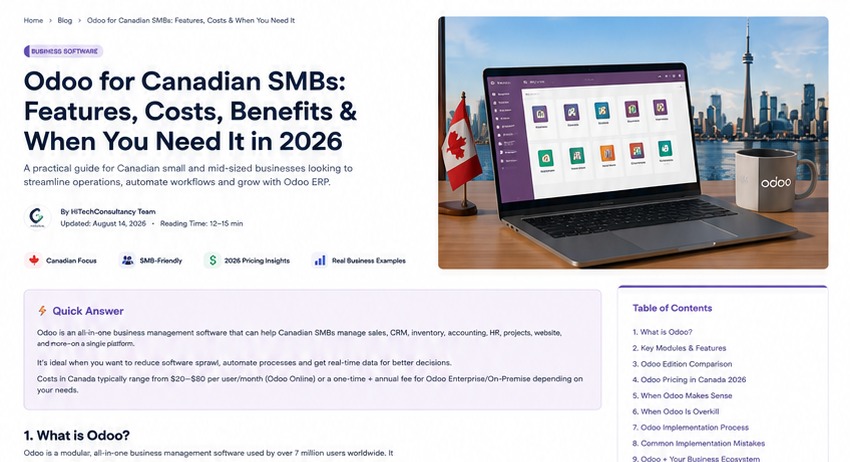
Odoo is a suite of integrated business applications covering areas such as CRM, sales, accounting, inventory, eCommerce, manufacturing, projects, HR and more. Odoo describes its platform as an all-in-one business management suite and explicitly positions it for businesses ranging from micro businesses to larger organisations.
For Canadian SMBs, however, the question is not simply whether Odoo has enough features. The commercial question is whether integrating the business around Odoo will create enough operational value to justify the software, implementation and change-management effort.
Business Insight
ERP should be treated as an operating-model decision, not merely a software purchase. If your processes are unclear, putting them into a new platform will not automatically fix them. The implementation should first identify the processes that need to become simpler, more measurable or more automated.
Odoo documents its Canada fiscal localisation, including Canadian accounting modules, fiscal positions, taxes and reporting features.
1. What is Odoo?
Odoo is an open-source business application suite built around integrated modules. Instead of buying one giant application where every function is bundled together, a business can select the applications it needs and expand its Odoo environment as requirements change.
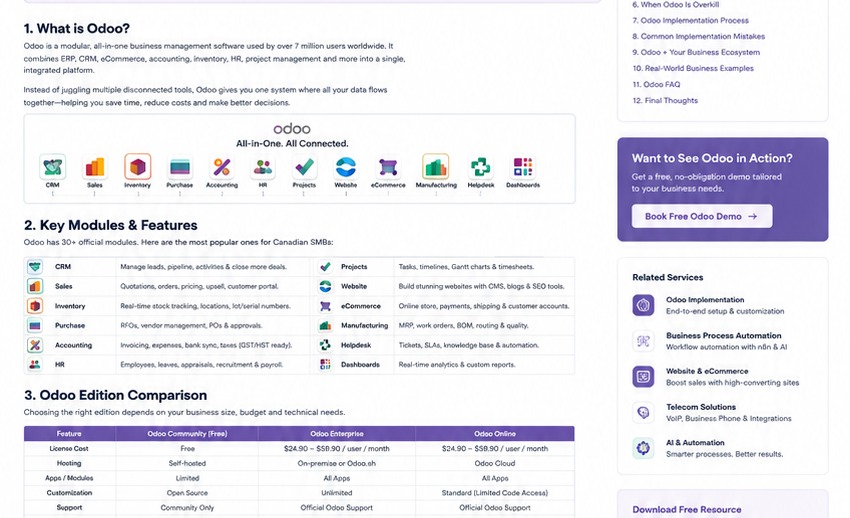
Core applications include CRM, sales, accounting, invoicing, inventory, purchase, manufacturing, project management, website, eCommerce, marketing, helpdesk and HR. Odoo's official app directory shows the breadth of the platform across website, sales, finance, inventory, manufacturing and other business functions.
The strategic advantage is the potential for connected information. A sales opportunity can become a quotation. A confirmed sale can create downstream operational work. Inventory can reflect orders. Accounting can receive relevant transaction information. Projects can track delivery. The exact workflow depends on configuration and business requirements.
2. Which Odoo modules matter most for Canadian SMBs?
Do not start an Odoo project by selecting every application. Start with the business processes that create the most friction or value.
CRM
Manage leads, opportunities, pipeline stages, activities and customer relationships.
Sales
Manage quotations, orders, pricing, customers and the quote-to-order process.
Accounting
Manage invoices, payments, reporting and accounting workflows with Canadian localisation.
Inventory
Track products, stock movements, warehouses, replenishment and fulfilment.
Purchase
Manage vendors, purchase orders, approvals and procurement processes.
Project
Manage projects, tasks, milestones, timesheets and delivery workflows.
eCommerce
Sell online while connecting website commerce with operational data.
Manufacturing
Support bills of materials, manufacturing orders, planning and shop-floor processes.
Helpdesk
Centralise customer issues, tickets, service workflows and response management.
Marketing
Coordinate email marketing, campaigns, SMS and other customer-engagement workflows.
Website
Build business pages and connect website activity with broader business processes.
HR
Manage employee-related workflows, time off, attendance and other HR processes.
Which modules should you implement first?
For many service businesses, CRM + Sales + Accounting + Project can be a logical starting point. For a distributor, CRM + Sales + Inventory + Purchase + Accounting may be more important. For an eCommerce business, Website/eCommerce + Inventory + Sales + Accounting may be the stronger starting architecture. These are examples, not universal prescriptions.
3. Does Odoo support Canadian businesses?
Yes, Odoo provides a Canada localisation package. Odoo's official documentation states that the Canadian localisation includes a Canadian accounting module and Canadian accounting reports, with features intended to support Canadian fiscal and accounting requirements.
The Canadian localisation includes a predefined chart of accounts and tax-related configuration, among other features.
Important Canadian implementation point
Software localisation does not replace professional accounting advice. Your accountant or qualified tax professional should confirm the configuration required for your corporation, province, tax treatment, reporting requirements and specific transactions.
For a Canadian implementation, the project team should therefore map business requirements first and then confirm that Odoo's available localisation and configuration meet those requirements.
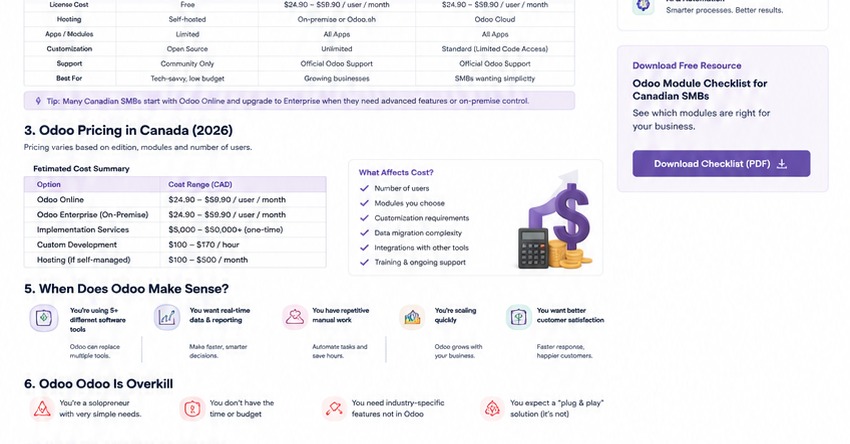
4. Odoo Community vs Enterprise: what is the difference?
One of the first commercial questions is which Odoo edition and deployment model makes sense. The decision should be based on the capabilities you need, the level of support required and the implementation model — not simply on whether an edition is labelled “free” or “paid.”
| Consideration | Community | Enterprise |
|---|---|---|
| Licensing model | Open-source edition | Commercial subscription |
| Applications | Core community functionality | Broader commercial feature set depending on plan |
| Support | Community-oriented support model | Commercial support options |
| Hosting | Can be self-hosted | Available deployment options depend on current Odoo offering |
| Customisation | Highly flexible for capable technical teams | Also supports extensive configuration/customisation |
| Best fit | Businesses with strong technical capability and appropriate requirements | Businesses wanting broader commercial features/support |
Odoo's current product information should be checked when making an edition decision because pricing, packaging and included features can change over time.
5. How much does Odoo cost in Canada in 2026?
This is one of the most searched Odoo questions — and one of the easiest to answer badly.
There is no responsible single “Odoo cost in Canada” number because total project cost depends on users, edition, applications, hosting, configuration, integrations, data migration, training, custom development and ongoing support.
| Cost component | What affects it? | Commercial planning question |
|---|---|---|
| Software subscription | Edition, users and current Odoo pricing | What recurring licence cost applies to the required users? |
| Implementation | Process complexity, configuration and project scope | How much consulting and configuration is required? |
| Data migration | Data volume, cleanliness and source systems | What data must be cleaned, mapped and imported? |
| Customisation | Unique workflows and requirements | Can configuration solve it, or is custom development necessary? |
| Integrations | CRM, payment, telecom, website and third-party systems | Which external systems must exchange data? |
| Training | User count and process complexity | How will employees learn the new workflows? |
| Support | Business criticality and internal capability | Who owns ongoing support and optimisation? |
Our recommendation on Odoo pricing
Do not sell or buy Odoo as “software plus a monthly fee.” Price the full business change: discovery, process design, configuration, migration, integrations, testing, training, launch and post-launch support. This creates a much more realistic Canadian SMB budget.
6. What are the biggest benefits of Odoo for Canadian SMBs?
Benefit 1: Fewer disconnected systems
When the same customer, order or product information lives across several systems, employees often spend time reconciling data. An integrated platform can reduce some of that fragmentation.
Benefit 2: Better process visibility
Management can potentially see more of the business process in one environment rather than relying on manually assembled spreadsheets and reports.
Benefit 3: Modular growth
A business can begin with a focused set of applications and expand later when there is a justified need.
Benefit 4: Automation potential
When business data and workflows are connected, automation opportunities become easier to identify. A trigger in one process can potentially create an action elsewhere, subject to configuration and integration capabilities.
Benefit 5: Better foundation for reporting
Management reporting is stronger when underlying data is structured consistently. An ERP does not magically produce good management information, but it can provide a better operational foundation.
Benefit 6: More consistent customer experience
When sales, service, finance and delivery can access relevant customer information, customers may experience fewer handoffs and repeated requests for information.
7. When does Odoo make sense — and when doesn't it?
Odoo may be a good fit when:
- Your business has several disconnected systems.
- Manual data entry is consuming meaningful staff time.
- Sales, operations and finance need better shared visibility.
- You expect the business to grow in users, locations or process complexity.
- You need inventory, projects, CRM, accounting or eCommerce to work together.
- You are prepared to standardise processes rather than endlessly reproduce old habits.
Odoo may not be the right fit when:
- Your business has very simple operational requirements.
- A single existing application already solves the problem well.
- Management is unwilling to invest time in process design and adoption.
- Critical requirements depend on a niche system Odoo cannot reasonably support.
- The business expects a large ERP implementation to be instant and disruption-free.
The goal is not to “sell Odoo.” The goal is to determine whether an integrated operating platform is commercially justified.
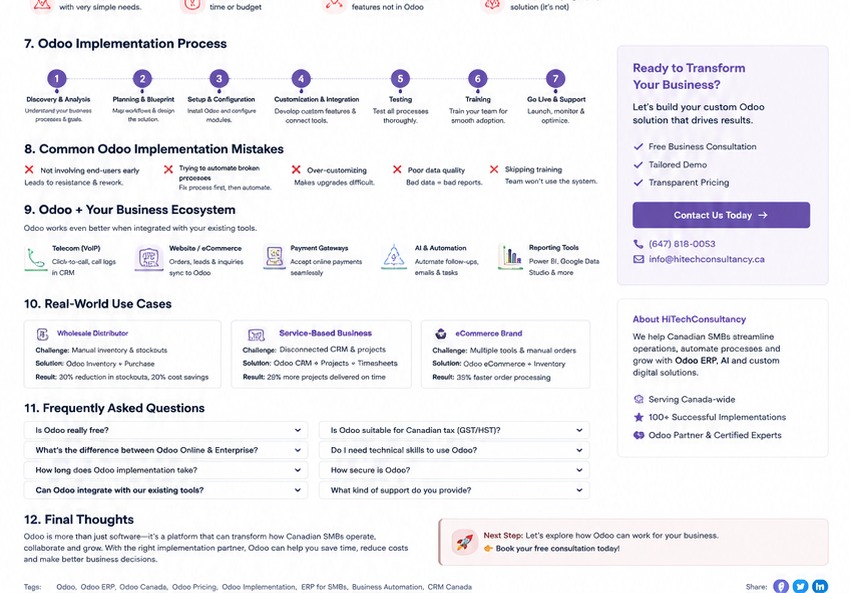
8. What does an Odoo implementation involve?
Implementation is where many ERP projects succeed or fail. The software itself is only one part of the project.
9. Common Odoo implementation mistakes
Mistake 1: Implementing too much at once
Trying to deploy every available application can overwhelm users and increase project complexity.
Mistake 2: Automating a bad process
If the process itself is unclear, automation simply makes the wrong process happen faster.
Mistake 3: Underestimating data migration
Old spreadsheets and systems often contain duplicates, inconsistent names, missing fields and outdated records. Migration is a business-cleanup project, not just an import. For accounting and financial information, the Canada Revenue Agency provides current guidance on business record-keeping, including electronic records.
Mistake 4: Treating training as optional
Users need to understand not only which buttons to click, but why the new process exists and what information they are responsible for entering.
Mistake 5: Over-customising
Custom development can be valuable when justified, but excessive customisation can increase upgrade and maintenance complexity.
Mistake 6: Ignoring reporting
Decide before implementation which management questions the system must answer. Then make sure the required data is actually captured.
Mistake 7: No post-launch owner
An ERP needs ownership after go-live. Someone must manage users, improvements, issues, documentation and future change.
10. Odoo integrations: where the real business value can expand
Odoo becomes more commercially interesting when it is connected to the other systems that already matter to the business.
Website
Connect website forms, eCommerce and customer activity to downstream business workflows.
Telecom
Potentially connect phone activity, customer records and follow-up workflows through supported integrations.
Payments
Connect payment workflows and transaction information where supported by the payment platform.
Coordinate customer communications and transactional workflows with the CRM and sales process.
AI & Automation
Use approved automation to reduce repetitive work and route information between systems.
Analytics
Combine operational data with management dashboards and reporting where required.
Integration decisions should always be based on an actual workflow. “We can integrate it” is not a business case. The better question is “What manual work, error or delay will this integration remove?”
11. Odoo + Telecom: a powerful combination for Canadian SMBs
This is particularly relevant for businesses where phone calls generate sales or service activity.
Our Business Phone Systems in Canada guide explains why telecom can become part of the revenue process rather than remaining a standalone utility.
Imagine a prospect discovers a company through Google, visits the website, calls the business, speaks with sales and requires a follow-up. If the phone system, CRM and ERP are disconnected, employees may manually transfer information between systems.
With an appropriate architecture, telecom activity can potentially feed a customer workflow, while Odoo manages sales, quotations, projects, invoices or other downstream operations. The exact integration depends on the phone platform, Odoo configuration and available APIs/connectors.
Business Insight
Telecom + CRM + ERP + automation creates a potential “lead-to-cash” architecture. The commercial opportunity is not the integration itself; it is reducing leakage between customer enquiry, sales follow-up, fulfilment and payment.
12. Odoo and AI: what should Canadian SMBs actually automate?
AI should be introduced after the underlying process is understood. This is especially important when the system contains customer, financial or operational information.
Potential opportunities include:
- Lead classification and routing
- Sales-note summarisation
- Customer-service categorisation
- Document processing
- Internal knowledge retrieval
- Automated follow-up tasks
- Reporting assistance
- Workflow notifications
Not every workflow should be fully autonomous. High-impact processes should include appropriate validation, access control, logging and human escalation.
For example, AI can potentially summarise a sales conversation and prepare a suggested CRM update. A human can review it before a consequential customer or financial action is taken.
13. Security, permissions and privacy considerations
An ERP can become one of the most important systems in a business because it may contain customer, employee, financial and operational information.
Implementation should therefore include role-based access, least-privilege principles, secure authentication, appropriate backups, change controls, logging and a clear offboarding process.
For Canadian businesses, privacy obligations may apply depending on the organisation, province, industry and information involved. The Office of the Privacy Commissioner of Canada publishes a privacy guide for businesses covering responsibilities such as meaningful consent and safeguards. Privacy requirements should still be assessed for the organisation's specific circumstances.
Do not give every employee unrestricted ERP access.
Permissions should reflect job responsibilities. A salesperson does not automatically need accounting administration rights, and a temporary contractor should not retain access after the engagement ends.
14. A practical Odoo decision framework for Canadian SMBs
Before requesting an Odoo quote, answer these questions:
- What business problem are we trying to solve?
- Which current systems are creating duplication or manual work?
- Which processes are most important to revenue?
- Which processes are most important to customer experience?
- What data must move into the new system?
- Which integrations are essential?
- What reporting does management actually need?
- How many users require access?
- What internal person will own the system?
- What is our realistic implementation window?
- What change-management support will employees need?
- What is the total first-year budget, not just the monthly licence?
If these questions cannot be answered, the next step should probably be discovery rather than a software purchase.
15. Three real-world Canadian SMB scenarios
Scenario A: Professional services firm
A professional-services business may need CRM, sales quotations, project delivery, timesheets and invoicing. Odoo could potentially connect those workflows so that a won opportunity becomes a delivery project and downstream billing process.
Scenario B: Distributor
A distributor may care more about sales, purchasing, inventory, warehouses, fulfilment and accounting. Here, inventory accuracy and order flow may be more important than sophisticated marketing features.
Scenario C: eCommerce business
An online business may need website/eCommerce, product data, inventory, purchasing, sales, customer service and accounting. The strongest ERP case appears when the business is growing beyond a simple storefront and needs operational control behind the website.
16. How Odoo fits into your broader digital ecosystem
Odoo should not exist in a silo. It can become one layer of a broader Canadian SMB technology stack:
Google/Search → Website → Lead Capture → Telecom → CRM → Odoo Sales → Delivery/Inventory → Accounting → Reporting → Automation
This is why our content cluster will connect Odoo with the other technology problems Canadian SMBs face.
For website strategy, see our Canadian Website Cost Guide. For telecom, see our Business Phone Systems in Canada guide. Future articles in this cluster will cover mobile apps and related digital systems.
17. Frequently Asked Questions
Odoo is a suite of integrated business applications covering areas such as CRM, sales, accounting, inventory, eCommerce, manufacturing, projects, HR and more. Odoo positions the platform for businesses of different sizes and industries.
Odoo has an open-source Community edition, while commercial Odoo offerings have subscription costs. The actual business cost also includes implementation, hosting where applicable, integrations, migration, training and support.
There is no single Canadian Odoo project price. Total cost depends on users, edition, applications, implementation, customisation, integrations, data migration, training and support. Current Odoo commercial pricing should be verified directly before budgeting.
Odoo provides Canadian localisation with Canadian accounting and reporting modules. Odoo's documentation describes the localisation as providing configurations for Canadian fiscal and accounting requirements.
It can be, especially where a business has multiple processes that need to work together. A very simple business may not need an ERP, so the decision should be based on actual process complexity and expected value.
Odoo can cover functions that are otherwise handled by multiple applications, but replacement should be evaluated process by process. Some businesses may still retain specialist systems where there is a strong reason to do so.
Implementation time varies widely with users, modules, integrations, data quality, customisation and organisational readiness. A focused implementation can be substantially simpler than a multi-department transformation.
Potentially, yes. Integration can use available connectors, APIs or custom development depending on the systems involved. The correct approach should be determined from the actual business workflow and technical capabilities.
No. Process discovery should come first. An ERP can standardise and automate good processes, but it can also make poor processes more complicated if the underlying workflow is not reviewed.
Not sure whether Odoo is right for your business?
We can start with the business problem rather than the software. We will map your current systems, identify the highest-value processes, recommend the right Odoo modules and outline an implementation approach before you commit to a large project.
Sources & Further Reading
- Odoo — ERP and all-in-one business platform information.
- Odoo — Canada localisation documentation for accounting and reporting.
- Odoo — official application catalogue.
- Google Search Central — Creating helpful, reliable, people-first content.
- Odoo — Canada fiscal localisation documentation.
- Canada Revenue Agency — Keeping records.
Editorial note: Odoo pricing, product packaging and features can change. Any commercial quote should be based on current Odoo terms and the client's actual scope. Canadian accounting, tax and privacy requirements should be confirmed with the appropriate professional where applicable.